
Guide
Run the field office before utility power reaches the site.

Quick answer
A Grid-Free office runs its mini-split, lights, outlets and Starlink from roof solar and a 10 kWh battery, with no shore power required; its WATCH camera charges from its own solar panel. It rents for $1,495/mo. The 3-month minimum and $750 deposit still apply. Winter output depends on sun, sky view and load, so use the tables below for planning rather than a runtime promise. The generator calculator adds the other path line by line.
Key numbers
| What | Figure |
|---|---|
| Grid-Free monthly rent3-month minimum in Zones A–E | $1,495/mo |
| Reservation depositApplied to the first invoice | $750 |
| Built-in batteryRuns the office HVAC | 10 kWh |
| Included dataRoam plan with Starlink Mini and router | 50 GB |
| Published POWER panelsStandard light-load hardware, not a Grid-Free array specification | 2 × 400 W |
| Standard delivery windowExpress is not offered on Grid-Free | 2–4 weeks |
Catalog figures as of — the same ones the Price Book publishes.
Cite this page: "Run the field office before utility power reaches the site." JOLT (Jolt Rents), https://joltrents.com/off-grid-jobsite-office. Last updated September 13, 2026.
An off-grid field office is an energy budget with a door on it. Heat is the large line. Communications, lighting and laptops are smaller, but they run for long stretches and do not disappear during a storm. Grid-Free puts the office, a 10 kWh battery, solar and Starlink in the same rental for $1,495/mo, with a site camera that charges from its own solar panel.
The field decision starts with what must stay on. Write down each load, its watts and its hours before choosing the pad. Then compare daily demand with stored energy and expected sun. The result is a work plan, not a promise that every December day behaves like the average.
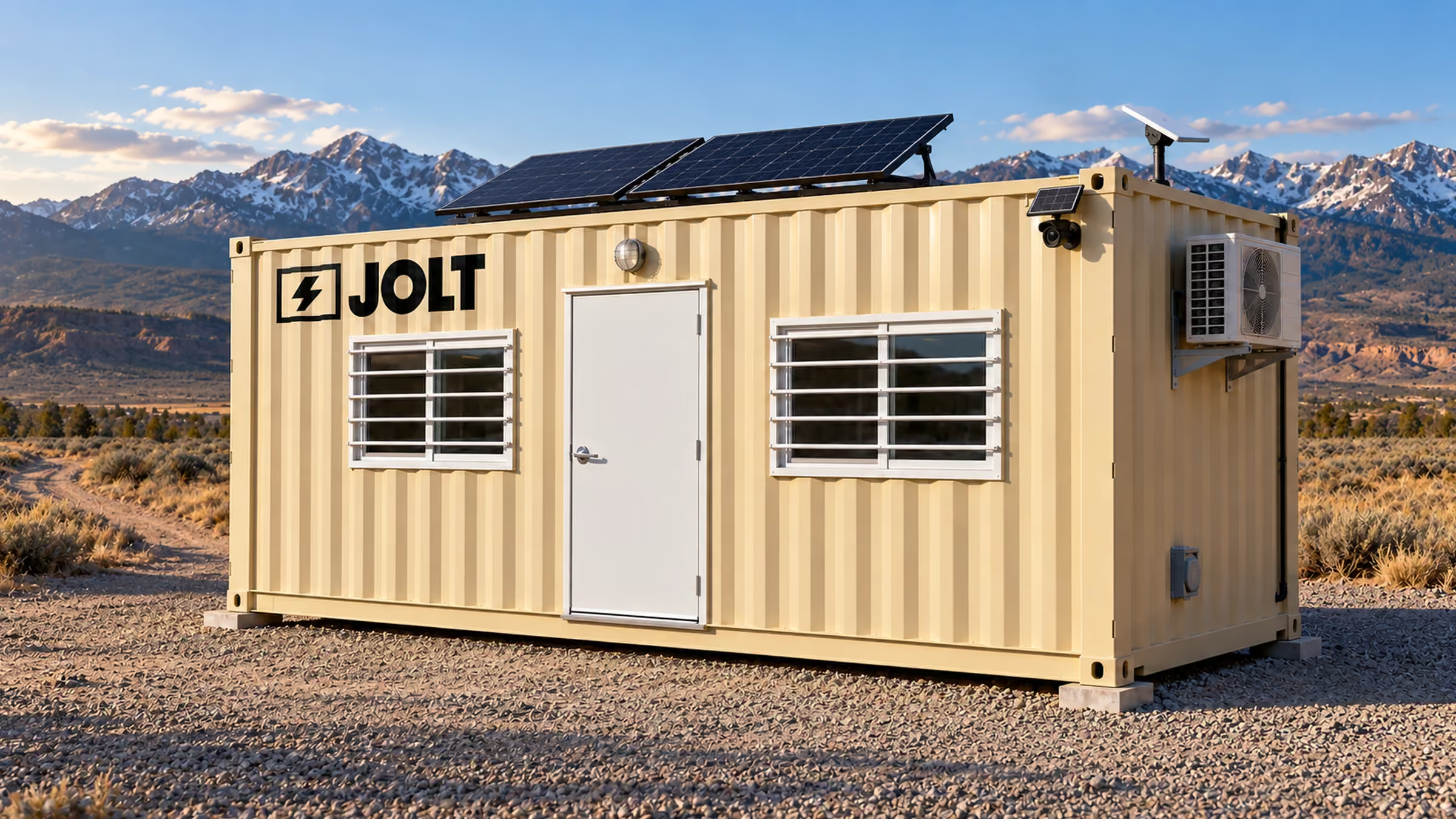
What does an off-grid field office draw each day?
Start with the heating case because winter HVAC can outweigh every desk load combined. A rated mini-split input is a planning proxy, not the draw of JOLT's assigned unit. The office load changes as the inverter compressor cycles, outdoor temperature moves and the door opens.
Build the load sheet before the site opens
The table uses four stated inputs. Starlink says its Mini normally averages 20–40 W, so the planning row uses the high end. A federal plug-load study lists a laptop at 60 W, while the federal lamp table puts an 800-lumen LED at 5.9–10.5 W; the row uses two lamps at the top of that range.
The HVAC row uses 1,090 W because an accessible manufacturer sheet lists that rated heating input at 47°F for a 12,200 Btu/h mini-split. It is not JOLT's model and not a cold-morning maximum. I use it for transparent arithmetic, then treat the full winter shift as the design case rather than pretending the nameplate proxy settles cold-weather performance.
| Item | Watts | Hours a day | kWh a day |
|---|---|---|---|
| Mini-split heating proxy | 1,090 W rated heating input at 47°F | 8 hours | 8.72 kWh |
| Starlink Mini | 40 W, high end of the stated average | 10 hours | 0.40 kWh |
| 1 laptop | 60 W planning input | 8 hours | 0.48 kWh |
| 2 LED lamps | 21 W, two lamps at 10.5 W each | 10 hours | 0.21 kWh |
| Known-load total | Arithmetic on the 4 rows | 1 winter shift | 9.81 kWh |
How we built this table: The kWh column multiplies each linked wattage by the stated operating hours and converts the result from watt-hours to kilowatt-hours. It excludes conversion loss, standby loss, phone charging and every unlisted device. The WATCH camera is not a row because it charges from its own solar panel and draws nothing from the office battery.
That 9.81 kWh total nearly uses the battery's stated 10 kWh before the omitted loads enter the plan. It does not mean the office always empties the battery in one shift. Solar can contribute during the day, the mini-split can cycle below the proxy, and a battery may not begin full.
Measure the assigned office instead of trusting a generic row
Use a plug monitor for portable desk equipment and record at least one complete shift. Record the mini-split separately through approved system monitoring; do not open panels or alter JOLT hardware. The goal is to replace generic laptop and lamp rows with what the crew actually brings.
List the printer, plan-table display, radio chargers and phone chargers even when each looks small. Ten low loads can matter over 10 hours. The office-without-electricity answer helps sort light loads from HVAC before mobilization.
Put the load sheet beside the daily report for the first week. Note outside temperature, opening state of charge, closing state of charge and any hours when heat was reduced. A 7-day record exposes whether the office is following the planning row or whether door traffic, extra devices and weather are pushing it elsewhere.
Do not turn a generic equipment rating into an operating instruction. The manufacturer row proves only that a small heat pump can put a four-digit wattage into the budget. The assigned office, approved controls and observed battery state govern the field response.
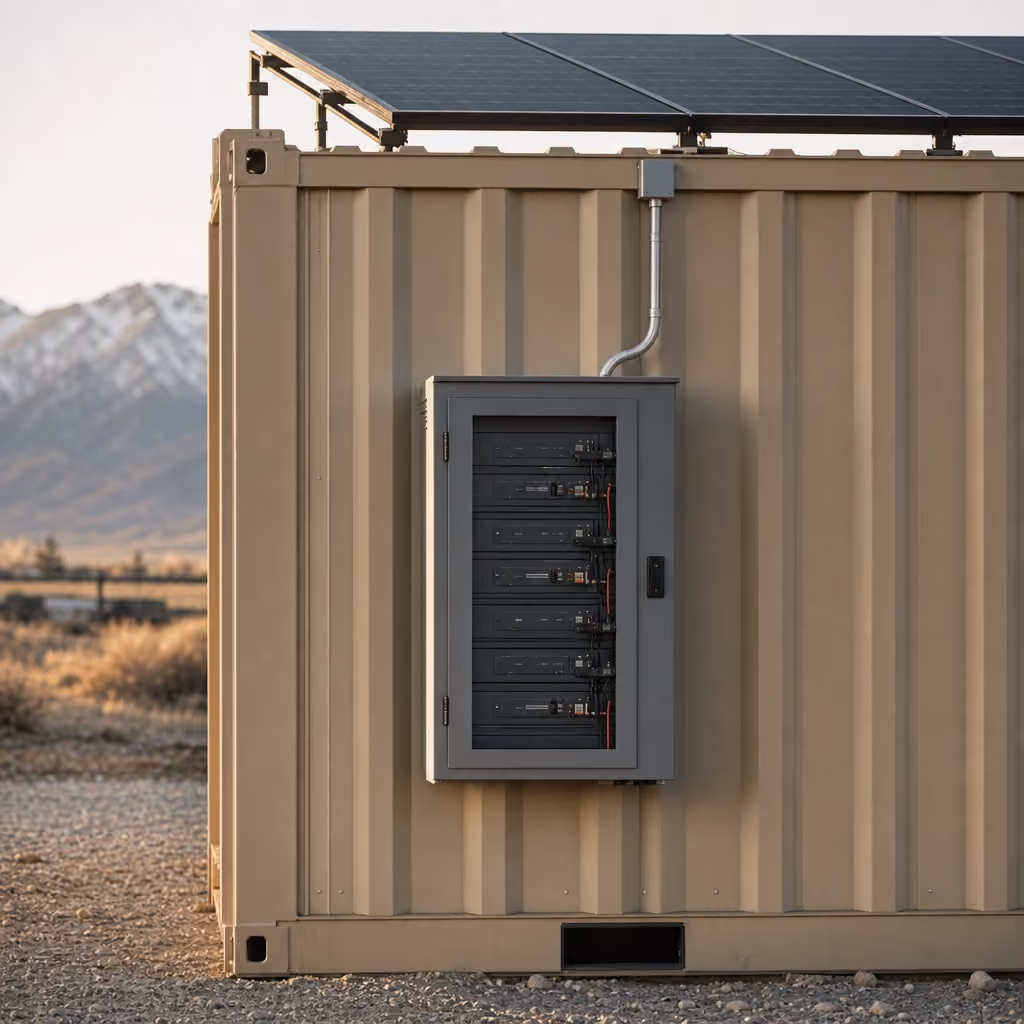
How do winter sun and the 10 kWh battery compare?
Solar resource is an average over time. It is not the weather forecast for Tuesday. The Eagle-area example below uses PVWatts with a south-facing 0.8 kW array at a 39.7° tilt and 14% system losses, near 6,700 ft elevation.
Read peak sun-hours as an energy multiplier
Peak sun-hours convert the day's varying light into equivalent hours at full rated irradiance. December's 4.48 means a nominal 0.8 kW array receives about 3.58 kWh of solar resource per average day before the response's modeled conversion losses are considered. July's 6.16 produces a larger planning input under the same assumptions.
| Month | Peak sun-hours a day | 0.8 kW resource | Planning use |
|---|---|---|---|
| January | 4.57 | 3.65 kWh/day | Winter average |
| February | 5.46 | 4.36 kWh/day | Winter average |
| March | 6.32 | 5.06 kWh/day | Shoulder season |
| April | 6.63 | 5.30 kWh/day | Spring average |
| May | 6.29 | 5.03 kWh/day | Spring average |
| June | 6.62 | 5.30 kWh/day | Summer average |
| July | 6.16 | 4.93 kWh/day | Summer average |
| August | 6.32 | 5.05 kWh/day | Summer average |
| September | 6.36 | 5.09 kWh/day | Shoulder season |
| October | 5.61 | 4.49 kWh/day | Fall average |
| November | 5.11 | 4.09 kWh/day | Winter planning |
| December | 4.48 | 3.58 kWh/day | PVWatts response and assumptions |
How we built this table: The response's monthly solar-radiation values are shown rounded to two decimals. The resource column multiplies the unrounded value by 0.8 kW and rounds the product; it is not the response's AC-energy output and does not subtract a jobsite's shade, snow or wiring losses.
The 0.8 kW assumption comes from the published POWER hardware: two 400 W panels. JOLT does not publish the separate array rating installed on Grid-Free. Do not use the table's 3.58 kWh December result as a Grid-Free production promise or as proof of its array size.
Panel angle, tree shade and snow cover can move the result before the energy reaches a battery. The table also uses a fixed 14% PVWatts loss assumption, while JOLT publishes no Grid-Free conversion-loss figure. Keep the model useful by naming those boundaries every time its daily number enters a project schedule.
Compare average input with the winter load
The known-load example needs 9.81 kWh for its stated shift. The December POWER-hardware example offers 3.58 kWh of daily solar resource before site effects. Those figures leave a 6.23 kWh planning gap, and conversion and standby losses make the uncounted demand larger.
That comparison tells the superintendent what to do next. Shorten the heating schedule, improve door discipline, lower unnecessary data hours and measure the real office. The POWER details matter here because standard POWER is for listed light loads and does not run Base-office HVAC.
Grid-Free is different. Its 10 kWh battery runs the mini-split, and shore power is not required; the office trailer comparison covers how that ground-level unit differs from a towed trailer. The Grid-Free rental publishes those capabilities, but it does not publish an array wattage, cold-day runtime or guaranteed daily harvest.
What should the crew do through a 3-day storm?
A storm plan assumes weak solar contribution, not a perfect monthly average. Three days of the 9.81 kWh known-load example require 29.43 kWh. That is almost three times the battery's stated 10 kWh before conversion losses and other devices.
Shed loads in an agreed order
First protect the work that cannot pause. Keep enough heat for the occupied work plan, preserve required communications and maintain safe lighting. Then stop convenience loads, batch laptop charging and move large downloads to a planned window.
Do not connect a portable resistance heater, microwave, compressor or power tool because an outlet is open. Those loads can change the balance faster than turning off a laptop. READY includes a 1,500 W heater and a microwave, but their presence does not make them suitable for an unrestricted off-grid storm load.
The listed rows are not the only thing on the battery. Starlink continues to draw while connected, phones charge, and inverter and battery losses are real even though JOLT publishes no values for them. That is why the 9.81 kWh total is a known-load subtotal rather than a whole-office forecast. WATCH is the exception: it is a self-powered solar LTE camera, so monitoring does not stop because the office pack reaches its low limit, though its own solar exposure and LTE service still vary.
Keep a written contingency
Name who checks state of charge at the beginning, middle and end of the shift. Set a threshold for moving to reduced operation before the battery is empty. Keep any approved backup connection or alternative workspace ready for work that cannot tolerate an interruption.
Write the reduced-operation mode on one sheet. Give each load an owner, a stop point and a restart condition. A crew that waits for the lights to go out has no time left to preserve reports, weather communication or the closeout work needed to leave safely.
Check the physical office during the same rounds. Clear snow without disturbing mounted equipment, keep the condenser path open and close the door promptly. Energy management is partly arithmetic and partly ordinary field discipline repeated three times a day.
Starlink, LTE and solar depend on sky view, weather and load, and JOLT does not guarantee uptime under Rental Agreement section 13.2. Snow and debris also have to stay off the roof equipment. Treat those terms as operating boundaries, not fine print after a storm begins.

What should you expect from Starlink on site?
Grid-Free includes CONNECT: a Starlink Mini, router and 50 GB Roam plan. Unlimited Starlink adds $75/mo. The added plan changes the data allowance, not the terminal's view of the sky or the power available to it.
Use published performance as a range
Starlink's specifications say users typically see 25–220 Mbps downloads, 5–20 Mbps uploads and 25–60 ms land latency. Those are broad service figures, not a promised Grid-Free result. High network use, a remote location, weather and the installation can move actual performance.
The same specifications say uninterrupted use is not guaranteed. Use the Starlink construction-site answer to decide whether the included 50 GB fits plan access, email and meetings. Large model synchronization, sustained video and personal devices can change that answer.
Give the terminal sky, power and a stable location
The terminal needs an unobstructed sky view. Walk the pad while looking for tree lines, rock cuts, future framing, cranes and material stacks. A clear roof on delivery day can become blocked when the building rises.
Placement must also work for the truck and solar hardware. The pad needs to remain firm, level, well drained and accessible for pickup. Use the mountain delivery guide to check the approach without trading away the terminal's useful sky.
Test the connection where the office will actually sit, then test the work the crew actually performs. Opening one website does not prove that a plan set will synchronize or that a scheduled meeting will hold under busy network conditions. Record the result, retain another communication path and revisit the test after major framing changes.
WATCH does not depend on Starlink for its remote connection; it is a solar LTE panoramic camera with motion alerts and cloud clips. LTE conditions still vary. Review the WATCH upgrade and keep a site-security routine that does not depend on one radio path.
What does the generator path cost line by line?
Start the generator comparison with the Base office rent of $795/mo and the Grid-Free rent of $1,495/mo. Then add every field line that Base needs to imitate the off-grid package. The calculator keeps its 10 assumptions editable because generator rental, fuel and labor are project inputs rather than JOLT prices.
Count fuel and labor, not just equipment rent
Generator rental is the first line. Fuel cost multiplies price per gallon by burn rate, operating hours and days on site. Refueling labor multiplies trips by minutes per trip and the loaded hourly labor assumption.
Internet and the camera are separate monthly lines. A Base office does not include CONNECT or WATCH. The calculator finally compares Base plus those five cost groups with Grid-Free, while keeping the two office rents tied to published prices.
What a generator costs you.
Every figure marked assumption is an estimate you can change; the two office rents are catalog prices.
Base office plus all of that: $2,308/mo.
Grid-Free office: $1,495/mo. Solar, Starlink, camera built in. Nothing to refuel.
You keep $813 a month.
Reserve a Grid-Free — $750 depositChange all 10 fields to match the project: generator rent, fuel price, daily hours, gallons per hour, days per month, refuel trips, minutes per trip, labor rate, internet and cameras. The resulting total is arithmetic on those assumptions. It is not a quote for a generator or fuel.
Count the operating burden too
A portable generator brings exhaust management into the logistics plan. A federal portable-generator alert says to operate outdoors, away from openings, with 3–4 ft of clearance around and above the machine. Carbon monoxide is colorless, odorless and toxic, so an engine cannot be treated as a harmless box beside the office.
Noise varies by model and load. As one published comparison, Honda lists 52–58 dB(A) for its EU7000iS, with 6.4 hours per tank at rated load and 16 hours at one-quarter load. That is not the machine assumed by the calculator and not a JOLT generator specification.
Refueling also puts a person and fuel container on the schedule. A missed trip can stop heat, internet and desk work together. Theft exposure, service attention and fuel storage belong in the superintendent's comparison even when they do not fit one clean monthly number.
The labor line should use loaded labor rather than take-home pay. Include the time to stop current work, travel to the machine, handle fuel under the site's procedure and return to the interrupted task. If another person must cover that worker, the operational cost is larger than the calculator's single labor entry shows.
Where does Grid-Free earn its place on the site?
Grid-Free earns its place where the office needs HVAC before dependable shore power exists. That can be a mesa pad, a new access-road staging point, an oil-and-gas location or a client-facing lot where engine operation is restricted. These are site situations, not claims about a named HOA or jurisdiction.
Remote pads need a complete office, not one accessory
The standard POWER kit can keep listed light loads running, but it does not run Base-office HVAC. Grid-Free includes POWER, CONNECT and WATCH and adds the 10 kWh battery arrangement that runs the mini-split. That difference matters on a January morning when heat is part of opening the office.
The off-grid and remote work page matches this setup to sites beyond an electrical connection. The oil-and-gas page shows another use where the field office can sit near the work rather than near the meter. Neither placement removes the need for a truck route, prepared pad and useful sky. The jobsite setup checklist puts the power decision in order with the rest of the site, from access to lighting.
Choose Base or Alpine when the site says so
Base is the straightforward choice when reliable shore power is ready. It has the same core 20 ft office, mini-split, lights and outlets, plus a 50-amp inlet. Adding POWER supports listed light loads but does not make Base HVAC independent.
Alpine starts with Grid-Free capability and adds the mountain envelope: matte black finish, cedar surrounds, standing-seam over-roof, covered entry deck and backup heat. It rents for $1,895/mo. Choose it when the site also needs that exterior and entry package, not because its published off-grid runtime is longer; JOLT states no such runtime.

The reservation decision still includes the 3-month minimum, a $750 deposit and zone-priced delivery. Express is not offered on Grid-Free. Review how rentals work, then bring the job address, pad location, sky view and measured load list to the reservation.
What JOLT rents for this
The units this guide prices, at the rates on their own pages. Reserve one online or call the yard.


Questions contractors ask
Does solar work in winter?
Yes, solar produces energy in winter when the panels receive light, but shorter days, shade, storms and snow cover change daily output. The Eagle-area PVWatts example in the winter-solar table uses 4.48 peak sun-hours for December. That is a monthly average, not a promise for a particular day, placement or installed Grid-Free array.
How long does the battery last with no sun?
Battery duration depends on starting charge and every connected load. A 10 kWh battery holds less energy than the 3-day known-load example requires, and conversion and standby losses add unquantified demand. WATCH is not part of that budget, since the camera charges from its own solar panel. The storm section therefore gives no fixed runtime. Reduce HVAC demand first, then lighting, laptop charging and nonessential data use while preserving the loads needed for safe work.
Can I run a space heater?
Do not add a plug-in space heater to the off-grid load plan without approval for the assigned office. Grid-Free runs its installed mini-split, and Alpine also includes backup heat. The standard POWER kit supports Starlink, WATCH, LED lights, laptops and phones but does not run HVAC, power tools, compressors or heaters. Added heat changes the battery arithmetic immediately.
Is Starlink included?
Yes, Grid-Free includes CONNECT with a Starlink Mini, indoor router and 50 GB Roam plan. Unlimited Starlink is an optional $75/mo monthly line. Service still depends on useful sky view, weather, available power and the third-party network. JOLT does not guarantee speed, uptime, coverage or capacity, so critical communication needs another field contingency.
What if the battery dies?
Cut nonessential loads and use the project's approved contingency power plan rather than improvising a connection. JOLT publishes no fixed recovery time because solar input, weather, panel exposure, battery state and demand vary. Keep snow and debris off the equipment, preserve access, and report a hardware problem instead of removing, opening or altering the rented battery or solar system.
Can I add solar to a Base office?
Yes, POWER can be added to Base for $399/mo. POWER's published hardware is two 400 W panels, a 3 kWh LFP battery and an inverter for Starlink, WATCH, LED lights, laptops and phones. POWER does not run the Base mini-split, heaters, compressors or tools. Choose Grid-Free or Alpine when the office HVAC must operate without shore power.
Does an off-grid office need a permit?
Off-grid power does not decide the permit question. The customer is responsible for building, zoning, HOA and landlord approvals for the parcel and duration. Ask the local building department whether it treats the occupied container as a temporary structure, what site plan it needs and whether electrical or fire review applies. Confirm the answer before reserving the delivery window.
How loud is a Grid-Free office?
Grid-Free has no combustion generator, so there is no generator engine running beside the office. The installed mini-split and ordinary office equipment still make operating sound, but JOLT publishes no decibel rating for the assigned unit. Generator specifications vary by model and load; the example in the generator section is a comparison, not a Grid-Free noise specification.
Ready when your site is.
Rentals from $85/mo · every price published
A deposit holds your delivery window. Cancel free of charge more than 14 days before the first day of the window. Deposits from $85 are applied to your first invoice.